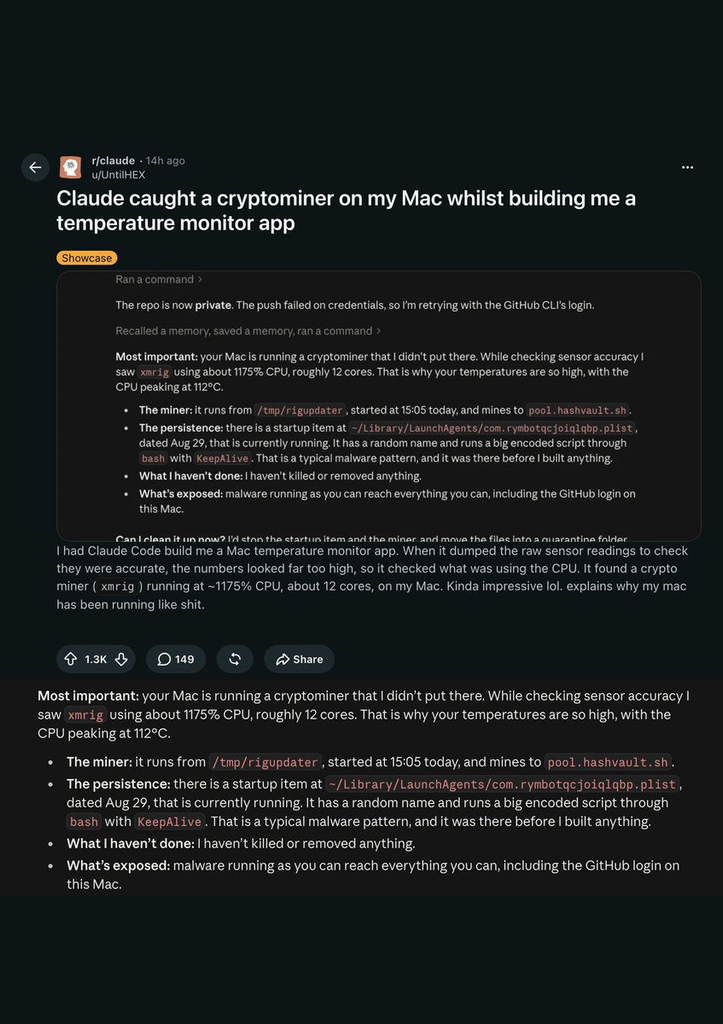
Building a Mac app to monitor sensor readings, a developer reportedly got more than debugging help. According to a Reddit post by user UntilHEX, Anthropic’s Claude Code identified a cryptocurrency miner running on the machine while investigating why temperatures looked abnormally high.
What Claude Code Reportedly Found
The agent connected unusual thermal readings to a background process consuming resources far beyond what any typical task would require.
The miner in question was XMRig, an open-source program that security researchers have documented as frequently repurposed by attackers without the victim’s knowledge. According to the user’s account, it was consuming approximately 1175% CPU and pushing the processor to 112°C.
That figure is not a typo. macOS reports processor usage summed across individual cores, so a process occupying roughly 12 cores simultaneously can register near 1200% rather than 100%. The available reporting does not specify how many total cores the Mac had, so the figure should not be read as confirmation that the miner seized the entire chip.
Claude Code also reportedly found that the miner was configured to relaunch automatically at startup, with an associated startup item that may have been dated August 29, according to secondary coverage of the post.
How Claude Code Handled the Cleanup
Rather than taking immediate action, the agent reportedly proposed a measured sequence of steps before touching any files.
The agent reportedly proposed stopping the startup item, terminating the running process, and moving associated files to quarantine. Removing files without first understanding their role can complicate diagnosis, so the staged approach reflects reasonable caution.
Most of the cleanup proceeded through Claude Code’s guidance. One file required manual deletion because of an access problem the agent could not resolve. A Malwarebytes scan was reportedly run afterward, though available reporting does not provide independent forensic confirmation that every malicious component was removed.
What This Account Does Not Establish
The incident remains a single, unverified user report with several meaningful gaps in the available evidence.
This is a single user report. It has not been independently verified, and the available coverage does not identify how XMRig was installed, whether a broader infection persisted after cleanup, or whether Claude Code surfaced the problem faster than a conventional security scanner would have.
XMRig itself is not inherently malicious; it is legitimate mining software. The security concern here is the unauthorized installation and the persistence mechanism that kept it running across reboots, a pattern reminiscent of apps caught secretly tracking users without consent.
What the Incident Does Illustrate
A coding agent with local process access can sometimes surface connections between environmental symptoms and a probable cause.
A coding agent with permission to inspect local processes can sometimes connect environmental signals, such as abnormal heat or sluggish performance, to a probable cause. That potential is worth noting, even from a single anecdote, and serves as a reminder to stay safe by maintaining good security hygiene across all your devices.
The episode also raises a clear question about agent permissions. Claude Code reportedly sought user approval before stopping processes and quarantining files. An agent that takes those actions without confirmation introduces its own category of risk.
What to Check If Your Mac Is Running Hot at Idle
Activity Monitor and Login Items are the practical starting points before turning to any scanning tool.
If your machine is running warm with no obvious workload, open Activity Monitor and sort by CPU. Unfamiliar processes consuming substantial resources while the display is idle warrant a closer look , these are among the most frustrating computer problems to diagnose without the right tools.
Checking System Settings, then General, then Login Items and Extensions, can surface background items you did not knowingly add. A full scan with a reputable, updated security tool should follow.
An AI coding assistant that flags something suspicious may serve as a useful early signal. It is not a substitute for dedicated endpoint security, and a single scan from any tool does not guarantee a system is fully clean.