


This article was created in partnership with Bark, but the views expressed within are our own.
The Bark Watch gives a kid a phone number, a location pin, and an SOS button, and that’s about where the feature list stops on purpose. There’s no internet, no app store, and none of the notifications that would normally hijack a kid’s attention, because the whole device is built on a Samsung Galaxy Watch8, which means the hardware inside is a real smartwatch rather than a plastic toy dressed up as one.
What You’re Actually Buying
The watch runs its own LTE connection, so it doesn’t need to pair to anyone’s phone plan. A kid can call approved contacts, text them, and hit SOS without a smartphone anywhere nearby, and since any number that hasn’t been approved gets blocked automatically, there’s no app store to sneak around and no browser to hide in either.
Bark is direct about how this works day to day: the watch doesn’t pair to a phone or the Samsung Wear app the way a consumer Galaxy Watch8 normally would. Everything runs through Bark’s own parent app instead, which keeps the whole setup simple. One app, one place to manage contacts, alerts, and settings, rather than juggling Bark’s controls alongside Samsung’s own software.
Texts sent from the watch are undeletable on Bark’s end too, so a kid can’t delete a conversation a parent might need to see later if something gets flagged.
Most kids’ smartwatches start with a smartphone’s feature set and bolt on restrictions after the fact. Bark built this one backward instead: strip the risk out first, then hand it over.
Design and Build
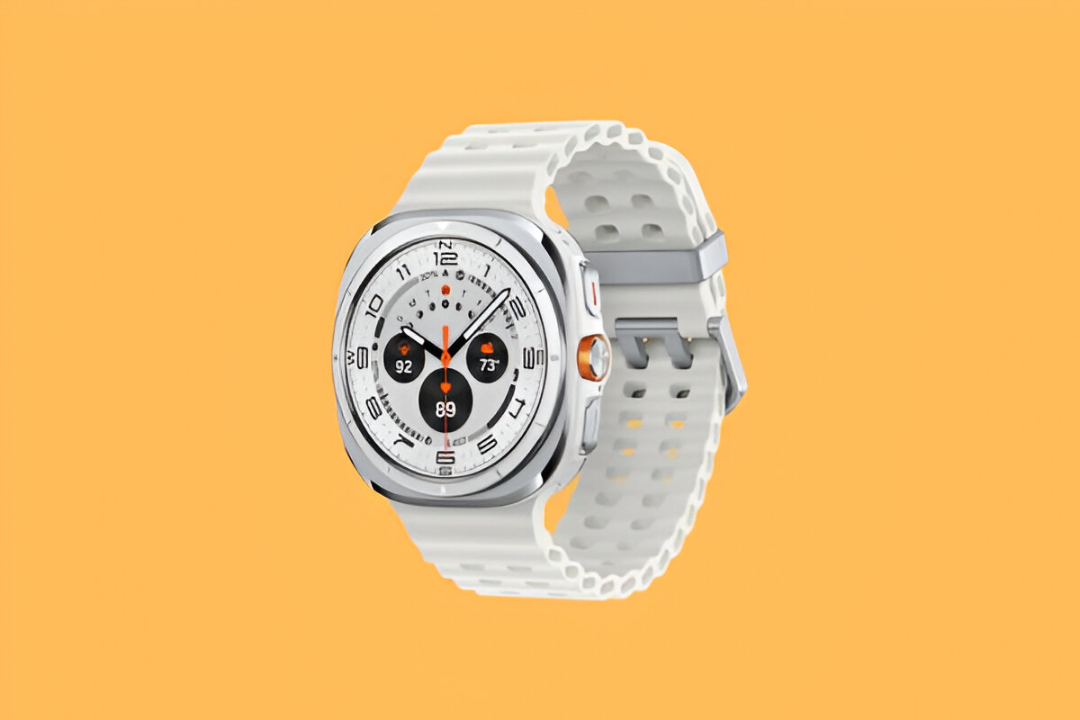
The watch runs on Samsung’s Galaxy Watch8 hardware, and it shows in every detail. A 1.34-inch Sapphire Crystal display sits at 438×438 resolution, wrapped in an Armor Aluminum casing in Graphite, and the whole thing carries a 5ATM plus IP68 durability rating. It measures 40mm across and runs on a 3nm, 5-core processor with 2GB of RAM and 32GB of storage, navigated through two physical buttons plus a digital bezel. One Amazon reviewer summed up the daily experience well: “The display is bright and easy to read at a glance… Comfortable, easy to use, and a great smartwatch for work and everyday life.”
That durability rating covers real swimming, not just splashes. Bark states the watch is rated safe for pools and shallow water as long as Water Lock is switched on first, based on lab testing at 5ATM (equivalent to 50 meters for 10 minutes) and IP68 (1.5 meters for 30 minutes). Diving, snorkeling, water sports, and hot water like a shower or sauna all fall outside what it’s built for, and water resistance diminishes over time with normal wear, so it’s worth treating the rating as a guideline rather than a lifetime guarantee.
The display sits slightly raised above the case rather than tucked behind a protective bezel, a design choice Engadget’s own Galaxy Watch8 review flagged directly after cracking a screen protector during testing. For a device that’s going to see monkey bars and backpacks more than an adult’s wrist typically does, you’ll definitely want to consider a screen protector.
It’s also why Bark’s $4 a month device protection plan, covering cracked screens outright, is probably worth adding for most families. Band material sensitivity varies from kid to kid the same way it does for any wearable, and most kids have no issue at all, but if a rash shows up under the band, switching to a different strap material usually clears it right up.
Screen and Hardware
The Super AMOLED display hits 3,000 nits at peak brightness, bright enough to read outdoors without shading the screen with a hand. Underneath, the 3nm, 5-core chip and 2GB of RAM keep things responsive, and GPS runs on L1+L5 dual-frequency positioning, the same technology used in far more expensive dedicated sports watches.
Rounding out the on-watch extras are heart rate monitoring, a voice recorder, and a calculator.
Battery Life
The watch runs on a 325 mAh battery, the same capacity confirmed across multiple independent sources for the 40mm Galaxy Watch8 this hardware is built on. Bark Watch expects about a full day of full-featured use (GPS positioning being the biggest draw) out of the watch, so you’ll want to get your kid into the habit of charging it every night so it’s always ready for the next day.
A power-saving mode arrives off by default, and turning it on can delay location updates “sometimes by a lot,” according to Bark’s own guidance, so leaving it off matters most if real-time location is the priority. Once the battery hits 1 percent, the watch drops into a Watch Only mode on its own: the screen still shows a clock, but location stops updating and calls or texts won’t come through. In the parent app, a watch in this state looks like it’s simply turned off.
Fitness and Communication
Beyond the safety features, the watch tracks steps, heart rate, and activity goals through Samsung Health, giving kids a simple way to build healthy habits without needing a screen-heavy app to do it.
Communication runs through group texting and speech-to-text, so a kid can talk instead of type, and contact management happens through the Bark Assistant, where a parent can add, review, and adjust the approved list at any time. Families can also open things up so a kid can reach anyone without needing approval first, whichever setup fits better.
No Camera on This Model
The Bark Watch does not have a camera, so a kid can’t take photos or record video on the device itself. Bark’s monitoring still covers any photos sent or received through messages though, so an alert can still fire if something concerning comes through that way.
The Actual Product: Bark’s Monitoring Layer
This is the reason to choose a Bark Watch over a generic kids’ smartwatch. Bark’s monitoring isn’t a basic profanity filter, it’s built to help catch serious concerns that most parenting tools miss entirely, cyberbullying, predatory contact, signs of suicidal ideation or self-harm, and other content that puts a kid at real risk. It scans texts and photos that hit the device to do that, and Bark alerts a parent to concerning content rather than handing over a full transcript to read through.
That trade-off, alerts instead of full logs, is Bark’s whole design philosophy, and it splits families into two camps. Some want exactly this: enough oversight to catch real problems without reading a middle schooler’s every text. Others want to see everything themselves and find the alert-only model too hands-off, so knowing which camp you’re in before buying will save a return down the line.
Once it’s set up, expect Bark’s AI to flag a wide range of content, some of it harmless, like a single swear word. Most families adjust their sensitivity settings in the first week or two once they get a feel for what a kid’s normal chatter looks like, and the alert volume settles down from there.
Location tracking runs two ways: a live map and custom alerts for specific zones.The SOS feature works by holding the top-right button, which brings up an emergency call option that dials 911 directly.
How It Compares to an Apple Watch
If you’re already pretty deep into Apple’s ecosystem, you might be tempted to just grab an Apple Watch since it’s designed to slot in without much friction. However, Apple Watches aren’t designed specifically for kids, nor are they built to be a safety-first device.
Apple Watch parental controls can restrict Screen Time, app downloads, and location sharing, but some controls and protections vary by device and setup and may not prevent every workaround a kid tries to throw at it. Bark Watches, on the other hand, are built from the ground up to prevent a child from being able to do any of those things on the Watch itself. An Apple Watch will introduce another thing to think about and manage day-in and day-out, while a Bark Watch lets you avoid that altogether.
Running Costs
The device costs $12 a month over 24 months, with the option to pay it off early. A required $15 monthly service plan covers cell service and parental controls, along with a Bark Premium subscription for the whole family, the same subscription Bark sells on its own for $14 a month to families monitoring just a phone or tablet. That works out to $25 a month for two years, then $15 a month once the device is paid off, and device protection against cracks, water damage, and loss costs extra on top of that, well worth it given the raised-screen design covered earlier. There’s a 60-day money-back guarantee if it doesn’t end up being the right fit.
Canceling after that 60-day window means covering the remaining device balance rather than walking away clean. Compared to Gabb’s Watch 3e, which charges a $30 activation fee on top of its own monthly plan, Bark’s all-in cost tends to land lower once the full math is done.
Who This Is For
A kid in elementary school or early middle school who needs a way to check in and get picked up, not one ready to manage a full smartphone with multiple distractions. A family already using Bark’s app who wants that same alert system on their wrist. Parents, grandparents, or any caregiver who’d rather get flagged on real problems first, than read every text themselves.