Your Mac Studio is powerful. It is also, aesthetically, a silver brick. The Wokyis G7 and G5 docks aim to fix that while solving real workflow frustrations: rear-mounted ports you can never reach, expensive internal storage you overpaid for, and a rotating cast of card readers cluttering your desk. Both models are currently funding on Kickstarter, with global shipments targeted for October 2026.
Design and Display
The retro shell is the hook, but the auxiliary display does actual work.
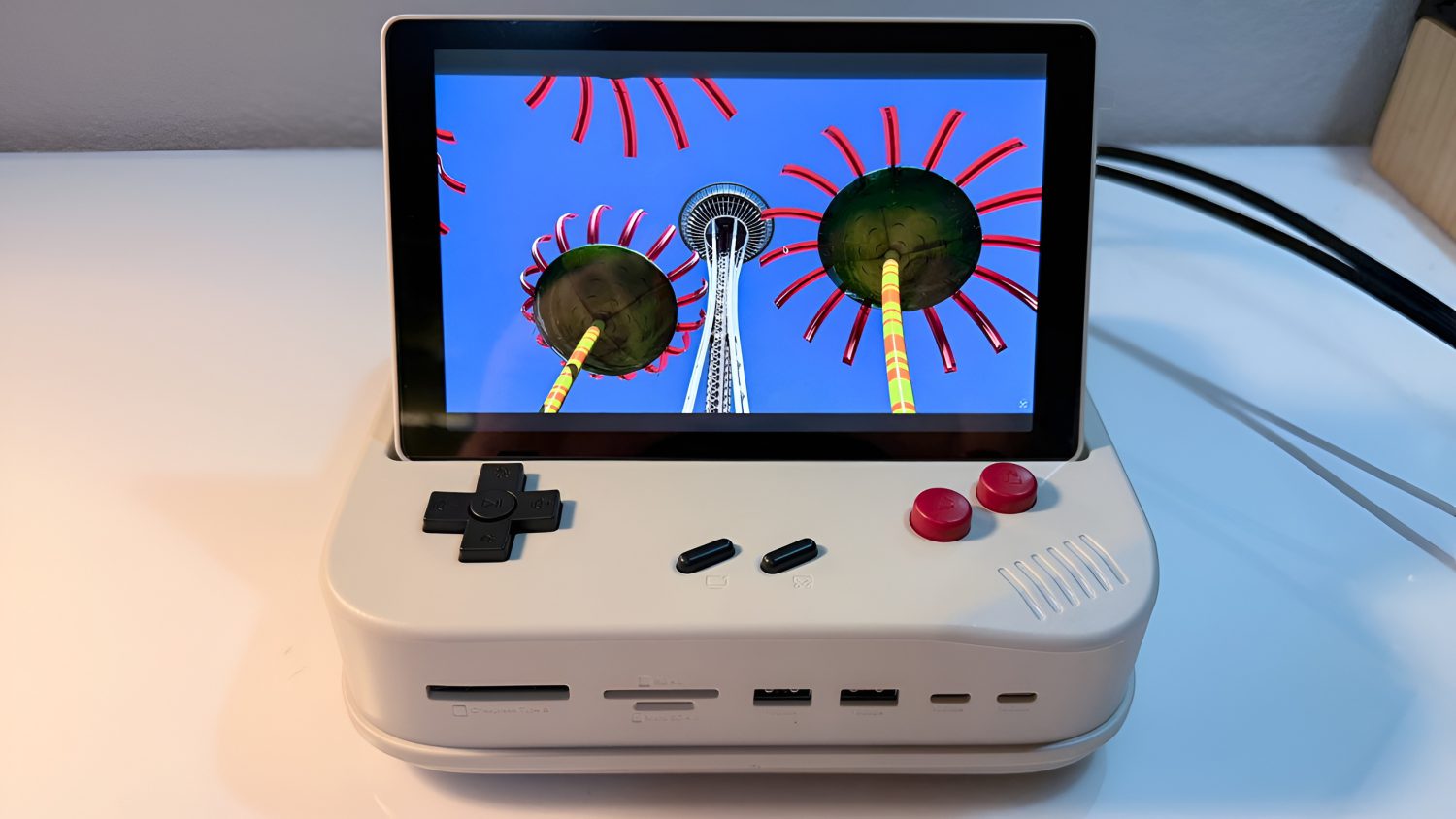
The G7 sits on top of a Mac Studio; the G5 sits on a Mac mini. Both arrive in beige housing with a directional pad and red action buttons. The aesthetic deliberately echoes a Game Boy crossed with the original 1984 Macintosh, a design choice that draws attention well before anyone asks about the specs.
The G7 carries a 7-inch IPS display at 1280×800; the G5 uses a roughly 5-inch panel at 1280×720. macOS treats both as standard external monitors, so any app window drags onto them without special software.
Early coverage describes the flip-up screen as initially seeming like a gimmick. In practice, reviewers found it genuinely useful for widgets, system monitoring, video podcasts, and color reference work inside Final Cut Pro. Nine remappable physical shortcut buttons handle volume, playback, copy/paste, screenshots, and brightness controls.
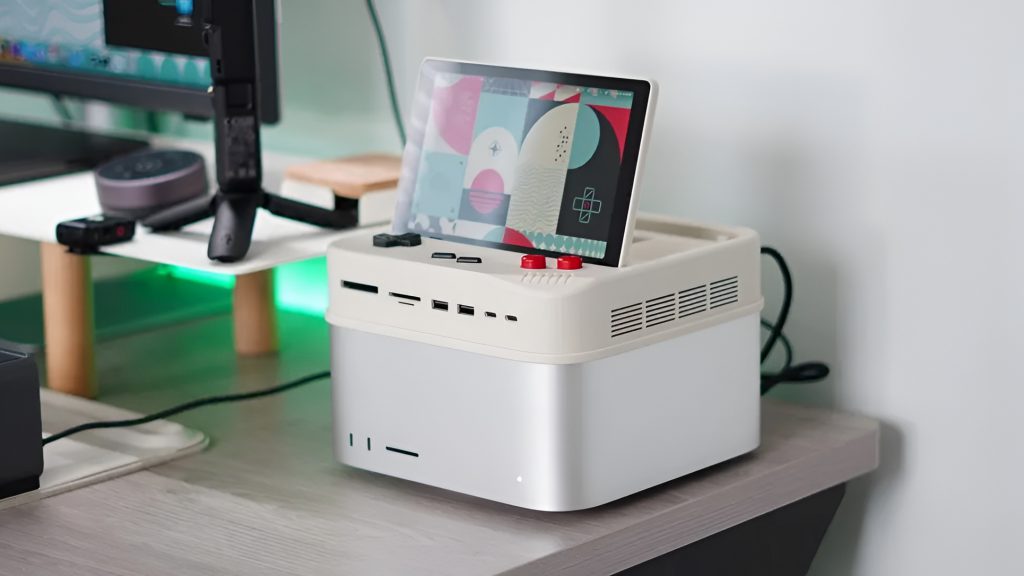
Key ports on the G7 Thunderbolt 5 model:
- CFexpress Type B reader, rated up to 1,000MB/s
- SD and microSD 4.0 readers, rated up to 312MB/s
- 2x USB-C and 2x USB-A, each at 10Gbps
- DisplayPort output supporting up to 8K at 60Hz
- Host Thunderbolt 5 connection at 80Gbps
Storage and Performance
Near-internal SSD speeds from an external slot make a credible argument against paying Apple’s storage premium.
Under the flip-up panel sits an M.2 NVMe enclosure that accepts drives in common lengths from 2230 through 2280, up to 8TB. On the Thunderbolt 5 G7, Wokyis and early coverage report throughput approaching 7,000MB/s, close to internal Mac SSD performance, which makes running a full Final Cut Pro project library from the external NVMe a credible option rather than a compromise.
The 10Gbps variants are bandwidth-constrained for anyone trying to push a high-speed NVMe, multiple displays, and fast card readers simultaneously.
Pricing
Early-bird pricing is significantly below MSRP, but Kickstarter terms apply.
| Model | Early Bird | MSRP |
|---|---|---|
| G5 10Gbps | ~$99 | ~$169 |
| G5 80Gbps | ~$199 | ~$339 |
| G7 10Gbps | ~$109 | ~$199 |
| G7 Thunderbolt 5 80Gbps | ~$219 | ~$369 |
Kickstarter pricing and specifications can shift before units ship, so the campaign page remains the authoritative source for current tiers.
Limitations Worth Noting
Kickstarter risk is real, and Thunderbolt 5 speeds require Thunderbolt 5 hardware.
Shipping timelines, firmware polish, and final specifications may all differ from current marketing materials. Long-term build durability is unproven, and Thunderbolt 5 hardware performance requires a Thunderbolt 5-equipped host Mac; older machines will fall back to lower bandwidth.
At the G7 early-bird price, you are consolidating a high-speed dock, an external NVMe enclosure, card readers, and an auxiliary display into a single unit. That represents a credible alternative to buying those components separately, provided the October 2026 ship date and final specifications hold. The campaign page remains the authoritative source for current backer tiers and updates.