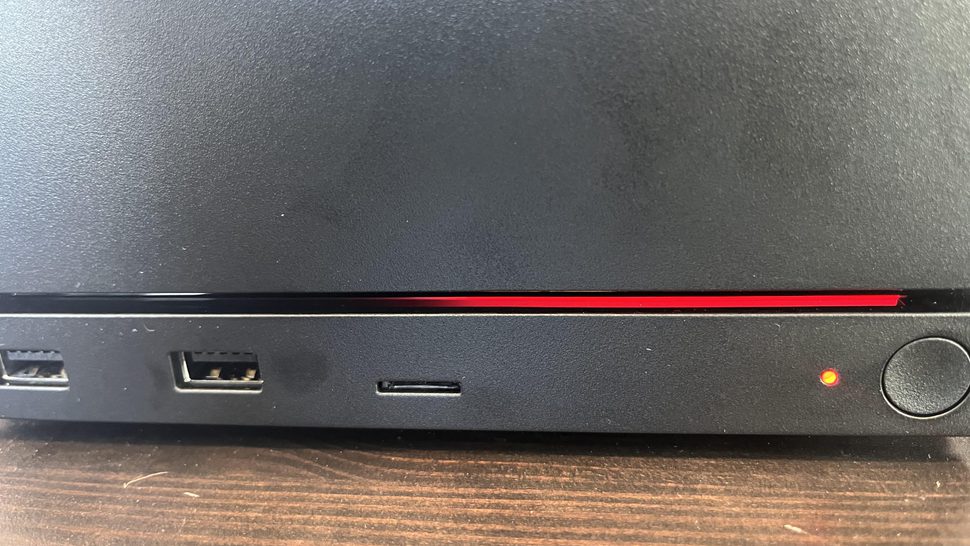
Some brand-new Steam Machines are lasting less than twenty minutes before the front LED bar lights up red on the right side, kills the video output, and refuses to boot. According to Valve’s own support documentation, that specific right-half red LED pattern indicates a GPU failure. The GPU is soldered to the motherboard — no swapping it out like a desktop graphics card. Sounds like a warranty nightmare straight out of 2007. But before boxing anything up, Valve has posted an official fix that takes less time than it takes to brew coffee.
What the Red Line Actually Means
Valve’s LED codes point to GPU failure, but that diagnosis isn’t always terminal.
The gaming community immediately christened it the “Red Line of Death,” and Xbox 360 RROD flashbacks were instant. Fair enough — that comparison lives rent-free in every gamer’s memory. Here’s the twist, though: not every red line means a dead GPU. Some RLOD cases turn out to be firmware or state-corruption issues, where the system flags a GPU fault when the hardware itself is still intact. Valve’s SteamHWFeedback account on Reddit posted a five-step CMOS-clear procedure to sort it out:
- Unplug the Steam Machine and press the power button several times to discharge residual PSU power.
- Plug back in. If the power LED shows a white breathing pattern, contact Steam Support directly — that signals a deeper problem requiring escalation.
- Hold the power button for roughly six seconds until the small indicator dot flashes, then release immediately at the flash.
- Watch the LED cycle through color codes. When it turns green, short-press the power button to trigger a full CMOS reset.
- On the next boot, the RGB bar should glow blue. Expect a longer startup — memory retraining after the reset takes extra time.
Can a CMOS Clear Tell Real GPU Failure From a Firmware Glitch?
A blue bar after reset means you likely dodged a hardware death sentence; a persistent red means it’s time to call Valve.
Reddit user me_hill — the person behind the original RLOD scare — revived their unit after unplugging it overnight and performing a BIOS reset. They later told the community that others “shouldn’t panic,” according to Eurogamer’s reporting. If your bar turns blue after the CMOS clear, you’re most likely dealing with a non-permanent fault. If the red stays? That points to genuine GPU failure. Sportskeeda, citing Valve’s documentation, notes the hardware fix requires “reballing the GPU or replacing the entire motherboard” — strictly a Valve repair job, not a weekend project.
Valve posting a working recovery procedure directly on Reddit is the right move. The question hanging over Steam Machine now is whether more units develop RLOD that no CMOS reset can cure. For now: try the fix first. Ship it back only if the red won’t quit.