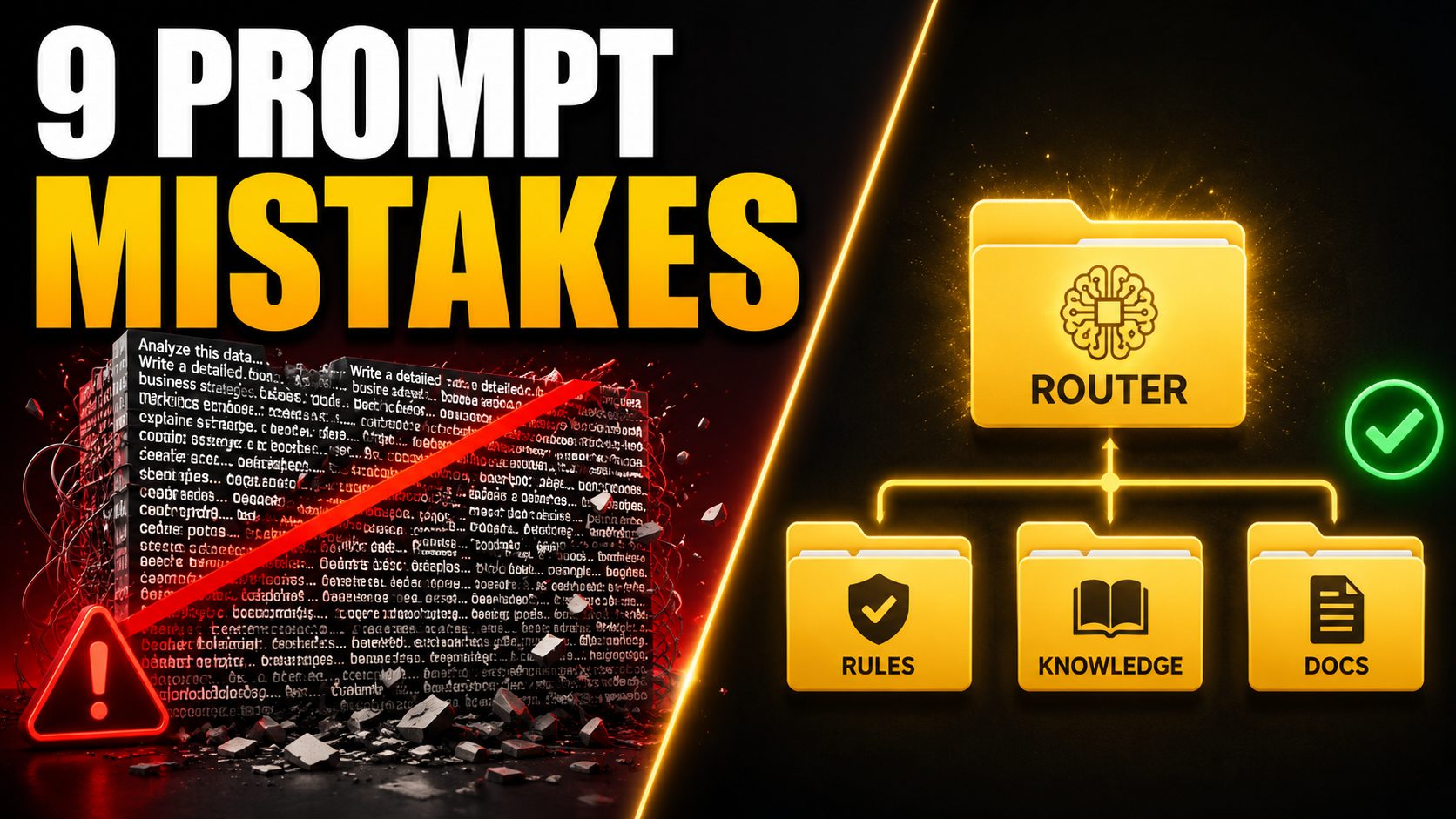
AI models stumble when fed a digital firehose of context, performing like a forgetful intern sorting a server room from one rambling email. Unstructured chaos inflates token costs and produces inconsistent outputs. Alex Brockway—who couldn’t write code a year before building this system—now runs Scale Boss, a real multi-tenant software platform, using these methods. This list unpacks a purpose-built folder architecture that transforms AI into a reliable collaborator. You’ll discover how clear routing, explicit rules, and smart documentation, all based on a free build kit, cut through the digital noise.
9. AI Project Folder Structure

A single router file and logical “rooms” replace wall-of-text prompts with surgical precision.
Alex Brockway’s purpose-built folder structure transforms AI from a forgetful intern into a reliable operator. The system centers on a router—a single top-level file that inspects tasks and directs the AI to relevant context files. It sidesteps giant, unwieldy prompts by loading only necessary information from logical “rooms.”
These rooms include Rules for consistent project standards, Knowledge for technical truths like schemas, and Documentation split by lifespan. This distinction ensures the AI doesn’t rely on stale plans, preventing output errors anyone managing complex projects knows well.
When an AI needs to refactor a complex database, it pulls precise details from curated Knowledge and Rules files, executing the task with surgical precision. This architecture renders AI development significantly more efficient and predictable.
8. The Router as Digital Traffic Cop

This single file routes context without storing all project knowledge, slashing token costs and errors.
The router functions as a digital traffic cop for AI workflows. When an AI needs to update a user interface, this file inspects the task and tells the AI precisely which design files to load, rather than forcing it to sift through entire project documentation.
This targeted approach dramatically reduces both token usage and error rates. Much like routers in web frameworks such as FastAPI, it keeps logic modular and focused. You must “guard the router” to prevent the AI from silently modifying this critical, load-bearing file.
The workflow establishes vital change control: an AI can propose a new route for a database schema, but your approval is mandatory. This system ensures efficient context delivery while maintaining structural integrity.
7. Rules Files: Your Project’s Constitution

Non-negotiable conventions become ironclad directives, transforming AI from forgetful to predictable.
Project standards become ironclad directives with dedicated Rules files. These files store non-negotiable conventions—naming patterns, architecture boundaries, and preferred components—acting as your project’s constitution.
They reside in their own folder, similar to how production GenAI projects use security/ or config/ directories, allowing the router to direct the AI to only relevant rules. This setup ensures AI outputs are consistent; when an AI generates a new UI, it adheres to exact design system specifications without constant intervention.
This explicit rulebook dramatically reduces repeated corrective prompts, transforming the AI from a forgetful intern into a predictable, reliable coding partner. Hours saved down the line.
6. Knowledge Files: Technical Truth Repository

Schemas and interfaces stored once eliminate re-derivation costs and logic gaps.
AI often re-derives facts per session, inflating costs and introducing needless errors. Knowledge files combat this, acting as the project’s technical truth—storing schemas, interfaces, data models, and service contracts.
This ensures AI looks up established details, drastically reducing inconsistencies. When an AI builds a feature with these accurate data models, it avoids the logic gaps common in less organized workflows. This structured approach mirrors systems like expert.ai Studio.
Centralizing this knowledge simplifies version control and auditing, establishing a single, verifiable source of truth. Reliability without the guesswork.
5. Documentation Split by Lifespan

Living plans, decisions, reference, and archive—organized by expiration date, not topic.
Traditional documentation lumps everything by topic; this AI-centric approach organizes by lifespan, a critical defense against stale context. You get distinct sections:
- living plans for current work
- decision logs detailing why choices were made
An AI confidently following a detailed plan that was solid 3 weeks ago but is now irrelevant? That’s a 5-alarm fire for your project. Beyond active plans, timeless reference materials—runbooks—remain perpetually valid.
The archive holds finished or superseded plans, clearly labeled “do not follow.” This mirrors software versioning, preventing your AI from acting like that friend who still uses a flip phone. Unchecked documentation is a recipe for an AI that builds exactly what you asked for, but not what you actually need.
4. Decision Records: Institutional Memory

Brief documents capturing “why” prevent endless re-litigation and phantom bugs.
The ‘why’ behind critical engineering choices often vanishes in commit history, forcing future teams to reverse-engineer past decisions. Decision records—brief documents capturing significant choices and their rationale—prevent this.
While code shows what was built, it rarely illuminates why. These records serve as your project’s institutional memory, preventing endless re-litigation and sparing you from corporate Groundhog Day scenarios.
Without foresight, an AI agent might ‘helpfully’ refactor a chosen component, unaware of crucial performance or compliance needs. These records, akin to Architecture Decision Records (ADRs), offer high-leverage, low-cost insurance, ensuring robust project stability.
3. Guarding the Router Rule
Change control prevents gradual drift from corrupting the system’s architectural backbone.
The router file’s role as the architectural backbone of an AI project is paramount. This load-bearing file dictates how an AI processes tasks, acting like the central nervous system for context.
Allowing an AI to silently rewrite this crucial component invites “gradual drift” that can quietly corrupt an entire system. The workflow establishes vital change control: an AI can propose a new route for a database schema, but your approval is mandatory.
You avoid the headache of chasing phantom bugs stemming from AI’s unapproved updates, ensuring the system operates within defined, human-approved boundaries.
2. Avoiding Giant Prompts

Small, focused files assembled by the router slash token costs and restore clarity.
Dumping pages of instructions on someone doesn’t make them understand you better. When you give an AI a single, massive prompt, you’re guaranteeing it misses the point. The model gets overwhelmed, crucial details vanish, and your idea gets lost.
Instead, a smart system uses small, focused files. A router, acting like a seasoned librarian, assembles only the right context for each task. This approach slashes token costs and reduces latency, aligning everything in versioned prompt files within dedicated folders.
Efficiency triumphs over verbosity.
1. Alex Brockway’s Free Build Kit and Course

Downloadable structure, start-to-finish walkthrough, and vendor-agnostic implementation—all at $0.
Alex Brockway offers a free build kit, designed as a downloadable, cloneable project structure. This comes with a free course that provides a start-to-finish walkthrough—exact setup for router contents, effective document splitting, and vendor-agnostic mirroring for skill files.
You could download this kit, launch the course, and instantly configure your AI project, skipping days of initial setup. You get practical, detailed implementation guidance, ensuring your AI doesn’t just work, but works intelligently from day one.
This entire package costs you exactly $0, and it’s all linked in the video description. Brockway is currently building Revstack in public, applying the same disciplined methodology, underscoring a crucial point: structured thinking, not just powerful models, defines practical AI success.