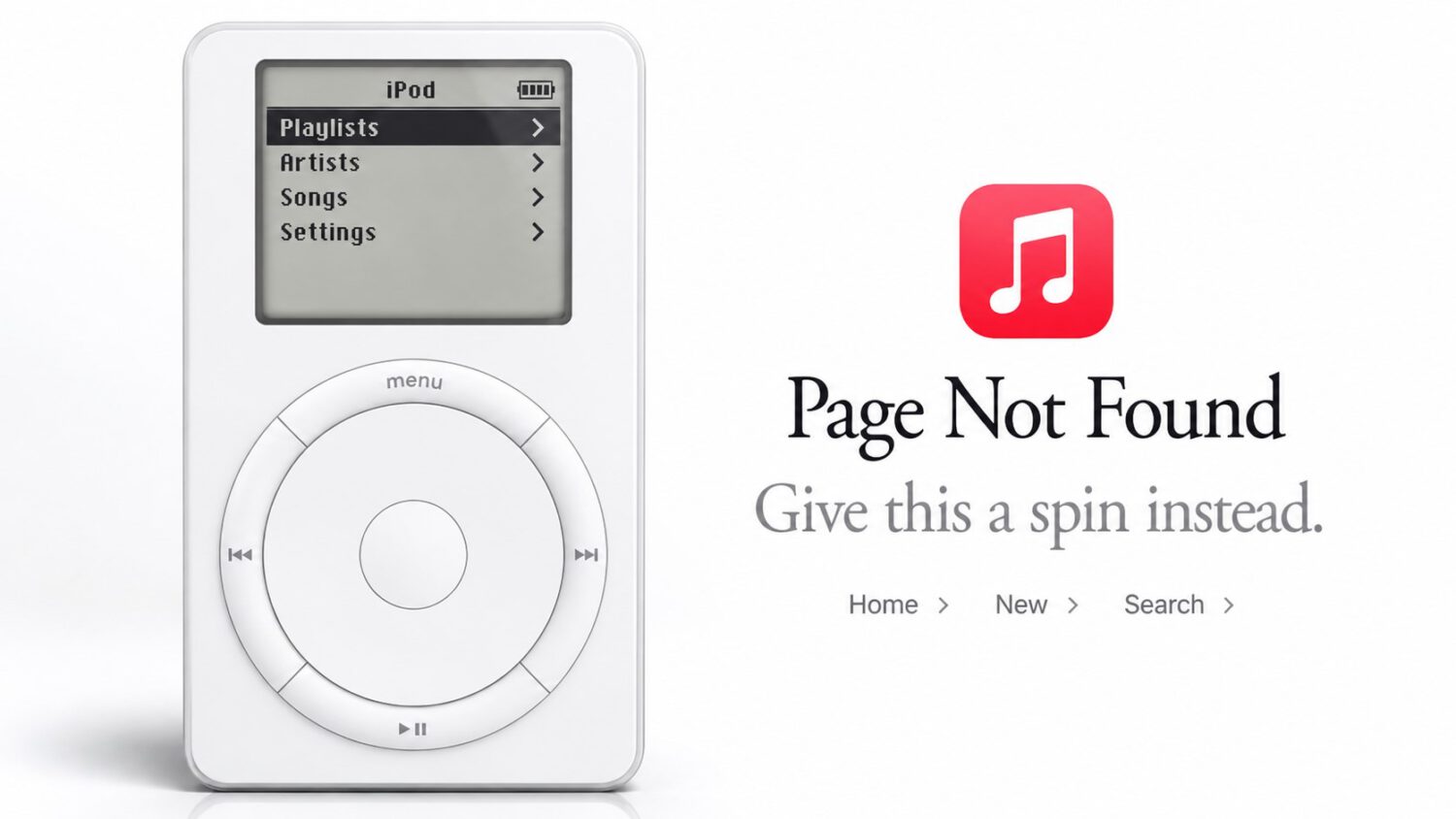
Apple turned a dead link into something worth clicking. Hidden beneath a “Page Not Found” message on Apple Music’s website is a fully interactive, browser-based recreation of the original iPod, marking 25 years since the device was introduced on October 23, 2001.
The prompt reads: “Give this a spin instead.” The virtual iPod includes a functional click wheel and full controls for Menu, Back, Forward, Select, and Play/Pause.
What It Does
A working click wheel, 1,029 songs, and one very familiar brick game.
The menu structure follows the original iPod’s layout: Playlists, Artists, Songs, and Settings. The experience also includes song scrubbing, shuffle, repeat, backlight controls, and the option to toggle click-wheel sounds on or off.
The library holds 1,029 songs, a quiet nod to the original device’s promise of fitting “1,000 songs in your pocket.” Tracks play as approximately 90-second clips rather than full recordings; no source has confirmed the reason for the shorter runtime.
Early-2000s nostalgia anchors the music selection. The library includes Eminem, blink-182, Evanescence, Shaggy, Mariah Carey, Alien Ant Farm, Sum 41, Bloc Party, Baha Men, The Ting Tings, Phoenix, and Justice. PCMag notes that some tracks postdate 2001, so the selection extends across the broader iPod era rather than a single year.
Longtime iPod owners will want to check the About screen. Holding the center button for several seconds reportedly unlocks Brick, a hidden game that was itself an Easter egg on the original device, according to Engadget.
How to Find It
Use your phone, not your laptop, and skip the native Apple Music app entirely.
To access the Easter egg, open a nonexistent Apple Music URL in a mobile browser. The native Apple Music app may redirect you away from the page rather than displaying the experience.
Touchscreen devices work best. The circular swipe gesture that operates the virtual click wheel maps naturally to a phone or tablet screen. Desktop browser behavior is reportedly unreliable, based on testing described by Engadget, though compatibility may vary by browser.
The experience reportedly works without an active Apple Music subscription, though behavior may vary by device and region. No removal date was identified in the available reporting.
Why It Matters
The iPod’s 25th anniversary is a retrospective, not a product tease.
Apple introduced the original iPod on October 23, 2001, at a launch price of $399. It offered 5GB of storage, a monochrome display, and FireWire connectivity, and it required both a Mac and iTunes to sync music.
It held up to 1,000 songs, a capacity that felt almost absurd at a time when portable CD players were still common. Apple discontinued the iPod line in 2022, and the available reporting describes this feature as an anniversary tribute rather than a signal of new hardware.
An anniversary tribute you can actually operate lands differently than a press release or a highlight video. Apple built something you can touch, even if the hardware itself is long gone.