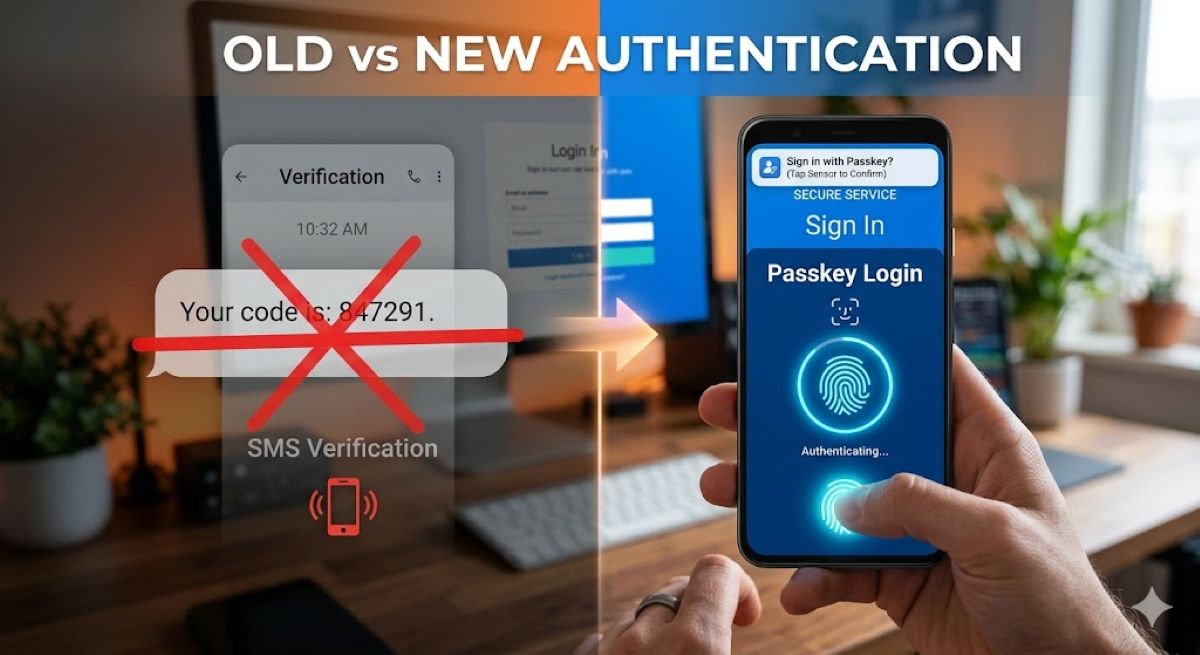
SMS security just died its long-overdue death. Microsoft officially announced it’s phasing out text message codes for personal account authentication, citing SMS as “a leading source of fraud.“ This affects hundreds of millions of accounts across Windows, Outlook, Xbox, and OneDrive—basically, if you’ve ever typed a six-digit code from a text to prove you’re you, that era ends now.
Why SMS Had to Go
SIM-swapping and network vulnerabilities made text-based authentication the weakest link in account security.
Microsoft’s blunt assessment reflects what security experts have warned about for years. Text message codes travel through cellular networks with decades-old security protocols, making them vulnerable to SIM-swapping attacks and SS7 network exploits.
You’ve probably heard the horror stories: someone calls your carrier pretending to be you, gets your number transferred to their device, and suddenly has access to your two-factor authentication codes. Passkeys eliminate this entire attack vector by keeping authentication credentials locked on your actual device.
What Passkeys Mean for Your Daily Login
Face ID, fingerprints, and PINs replace typing codes—just like unlocking your iPhone, but for everything.
Think of passkeys as your device’s way of vouching for you without sharing secrets. Instead of Microsoft sending you a code, your phone or laptop generates a cryptographic signature using a private key that never leaves the device.
You unlock it with Face ID, a fingerprint, or your device PIN—the same biometric routine you’re already doing dozens of times daily. Windows 11 users will start seeing “Sign in faster with your face, fingerprint, or PIN” prompts, making the transition feel more like an upgrade than a security lockdown.
The Catch: Passkeys Aren’t Perfect
Browser compromises and account recovery scenarios reveal new vulnerabilities experts are still solving.
Passkeys crush traditional phishing attacks, but security researchers warn they can’t protect against fully compromised browsers or malware that controls your entire session. If an attacker already owns your browser, they might trick you into approving legitimate-looking biometric prompts for malicious purposes.
Account recovery also gets trickier—lose your passkey-enabled device and your backup email access simultaneously, and you’re in for a support ticket nightmare.
Microsoft’s move mirrors industry-wide SMS abandonment, joining Google and Apple in treating text codes as legacy tech. Set up your passkeys and verify backup email addresses now, before you get locked out of the passwordless future.