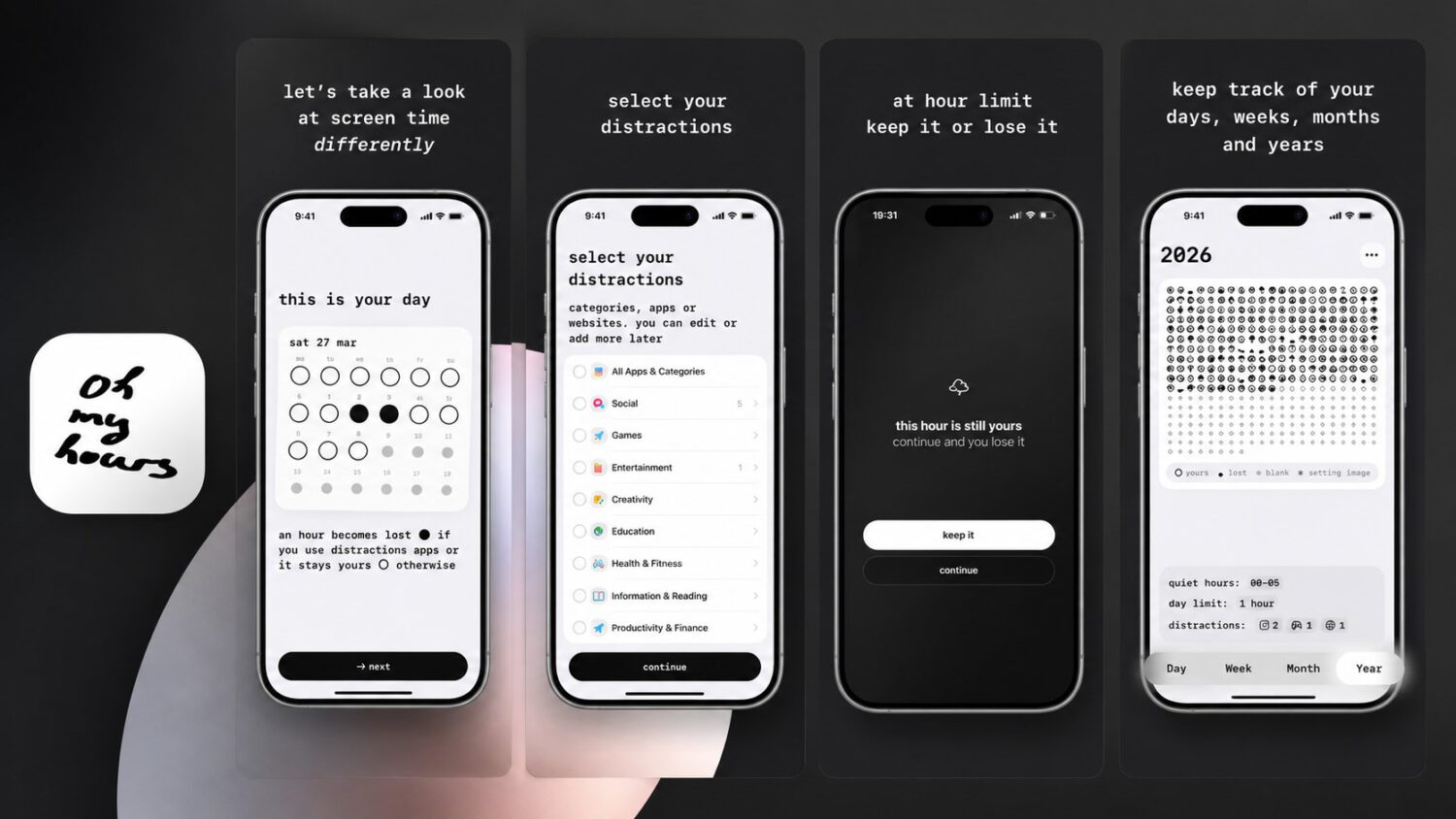
Per-app tallies tend to register as isolated minutes rather than a coherent pattern, which makes them simple to dismiss. Oh My Hours, a free app for iPhone and iPad, takes a blunter approach by marking each hour of the day as retained or lost.
How the App Works
Binary verdicts, one hour at a time.
During setup, specific apps or entire categories are designated as distractions. Opening one can turn the current hourly block into a blackened mark in a daily display of circles representing each hour.
The app includes a checkpoint: according to the App Store listing, closing the distraction app promptly may keep the hour intact. Its primary design is reflective rather than blocking-oriented, which distinguishes it from conventional app blockers.
Day, week, month, and year views let users track flagged blocks over time. The yearly view, in particular, can surface patterns that any single day’s data easily obscures.
The free version covers the core experience, including day and week views, widgets, and data export. A premium tier, listed at $9.99 per year or $19.99 for lifetime access, unlocks threshold customization and additional settings. As of the current App Store listing, the app requires iOS 26.2 or later and has no Android version.
The Strength and the Trap
One flagged hour communicates what a per-minute tally often doesn’t.
A lost hour is a more immediate visual judgment than a dashboard entry reading “Instagram: 14 minutes,” and the cumulative yearly view can reveal patterns that daily data tends to obscure. That compression is the app’s central design proposition, though it remains the author’s analysis rather than a measured finding.
The same all-or-nothing logic introduces a risk identified in hands-on coverage of the app. Once an hour is flagged, a user may rationalize continuing to scroll until the next hour begins rather than stopping. Users can adjust thresholds and reset incorrectly marked hours, which softens that possibility without eliminating it , a dynamic not unlike what is seen in apps tracking users‘ habits and behavior in the background.
Where It Fits Among Existing Tools
Complementary to Screen Time, not a replacement for it.
Apple’s built-in Screen Time offers per-app and per-website diagnostics, notification counts, pickup data, scheduled Downtime, and cross-device reporting tied to a shared Apple Account. Oh My Hours sacrifices that diagnostic depth for a more direct hourly judgment. The two tools address different questions and can be used alongside each other, much like AI-powered websites that supercharge your productivity complement rather than replace native device features.
Several other apps occupy adjacent space with distinct design philosophies:
- One Sec inserts a pause before the user reaches a selected app (iOS and Android)
- Forest grows a virtual tree during phone-free periods, with the developer citing real-world tree planting (iOS and Android)
- ScreenZen adds customizable pauses, challenges, and timers before app access (iOS and Android)
- Brick pairs a software app with a physical NFC device; tapping it blocks or unblocks selected apps (iOS and Android)
Platform availability and features for these apps should be confirmed against their current official listings before use, as details may change.
Available Now
The core question the app is really asking.
Oh My Hours is free on the App Store for iPhone and iPad running iOS 26.2 or later, with pricing and availability subject to change. For users who already ignore per-minute screen-time tallies, the hourly verdict offers a meaningfully different kind of prompt. Whether that framing changes behavior more effectively than detailed dashboards is a question hands-on experience, not the design alone, ultimately answers.