Trying to focus on work while Canvas videos flash like a disco ball in your peripheral vision feels like the digital equivalent of having someone tap your shoulder every thirty seconds. Spotify’s aggressive push toward TikTok-style visuals has frustrated users who just want their music without the visual noise.
The streaming giant finally heard the complaints and rolled out universal video controls that let you disable everything from looping Canvas animations to artist clips with simple toggles.
Three Switches to Rule Them All
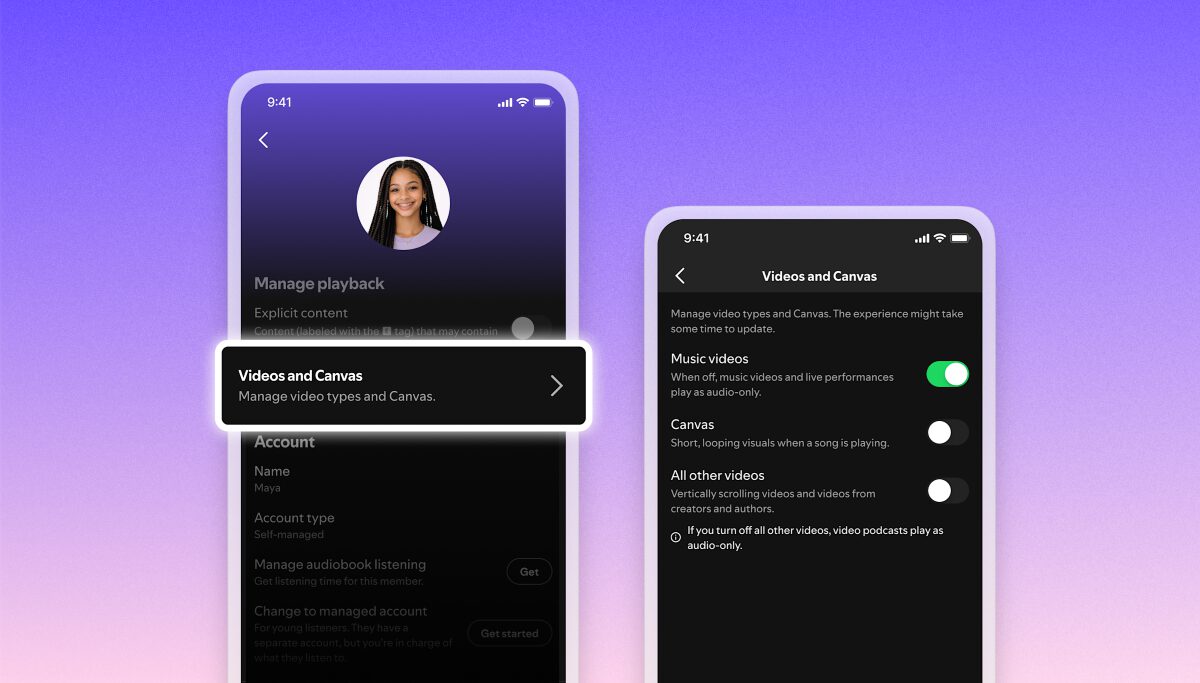
The new controls live in Settings > Content and Display, offering granular control over different video types.
You’ll find three distinct toggles waiting in your settings menu:
- The Canvas switch kills those short looping visuals that play during tracks—the ones that somehow make every song feel like it needs a music video
- The music video toggle handles full-length official videos
- “All other videos” covers video podcasts, vertical scrolling content, and those 30-second artist promotional clips
Family plan managers can set preferences for all members, finally ending household arguments about whether your teenager’s account needs to autoplay everything.
Your Data Plan Will Thank You
Disabling video content reduces bandwidth usage and extends battery life during long listening sessions.
The practical benefits hit immediately once you flip these switches. Your morning commute playlist stops burning through mobile data on video content you never asked to see. Long listening sessions drain less battery without video processing running in the background.
Static album art replaces the visual chaos, letting you actually focus on the music—revolutionary concept, right? The toggles work universally across iOS, Android, and desktop, so your preferences follow you everywhere.
Fighting the Video-First Future
This move acknowledges user pushback against Spotify’s multimedia transformation since 2018.
Spotify reportedly introduced Canvas in 2018, video podcasts during the 2020 pandemic boom, and music videos throughout 2024. The company suggests over 70% of users want more video content, yet here we are with disable switches—classic tech company math.
These toggles represent a rare admission that not every “engagement-boosting” feature actually improves the user experience. Sometimes people just want their audio streaming service to stream audio without turning into a budget YouTube competitor.
The real victory here is that user complaints can still influence product decisions when they’re loud enough and persistent enough.