




Users reported sign-in failures, payment errors, and download problems across multiple Apple services on November 17, 2026, even as Apple’s official indicators showed normal availability.
Multiple Services Flagged Across Apple’s Ecosystem
Reports of failures spread across authentication, payments, and content services at the same time.
On November 17, 2026, Apple users reported disruptions affecting iCloud, Apple Pay, the App Store, Apple Card, Apple Music, Apple Support, Sign in with Apple, and iPhone activation. The complaints spanned authentication, cloud services, digital payments, and content access, though Apple made no public statement identifying a single cause.
What Users Actually Experienced
Verification failures and payment errors were the most common complaints logged during the disruption.
Some users found themselves unexpectedly signed out of iCloud, then blocked by identity verification failures or generic error messages when attempting to sign back in. App Store customers reported loading failures, stalled downloads, and purchase errors, while Apple Pay users reported payment failures.
According to Downdetector, reports for Apple Pay began rising around 11:40 a.m. Eastern Time, with iCloud complaints surging shortly before noon. Downdetector data reflects user-submitted reports, not independently verified service failures, so the numbers indicate the scale of perceived impact rather than confirmed technical outages.
The Gap Between the Status Page and Reality
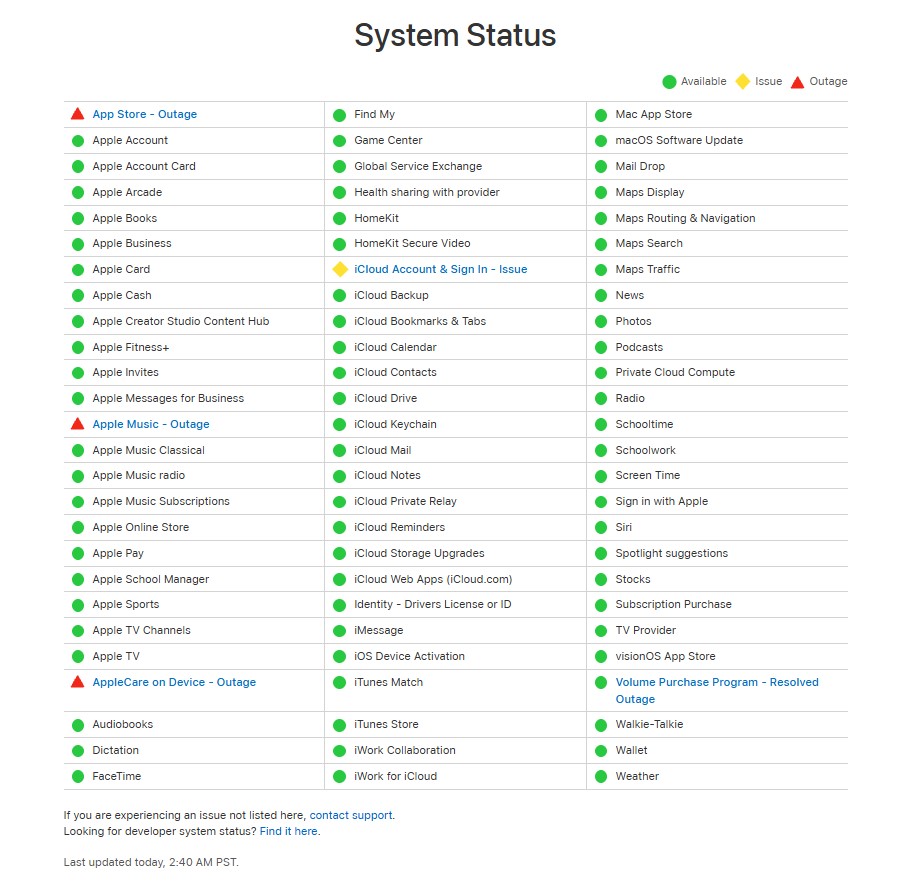
Apple’s official indicators showed normal availability while user complaints continued.
Apple separately identified an intermittent Subscription Purchase issue, which it later marked resolved. The broader set of Apple Pay, App Store, Apple Music, Apple Card, and Apple Support complaints is primarily supported by user reports and news coverage rather than confirmed Apple status entries.
Apple’s status page can reflect overall operational normalcy even when problems are intermittent or geographically limited, much like the network disruption Nasdaq experienced when its status reporting lagged behind live failures. Issues concentrated in specific account or payment flows may not trigger a status change. Users reporting persistent problems after a service is marked resolved are not necessarily mistaken.
What Apple Has Not Said
The cause of the broader disruption remains publicly unexplained as of publication.
As of publication, Apple had not publicly identified what triggered the reported failures across iCloud, Apple Pay, the App Store, and Apple Support, nor confirmed whether those problems shared a single technical source. No verified evidence emerged at the time of reporting indicating a security breach was involved.
Steps Worth Taking If Services Are Still Failing
A few targeted actions can limit disruption without making the situation worse.
Before changing account settings or assuming your device is faulty, check Apple’s System Status page directly. If Apple Pay or Apple Card transactions are failing, a physical debit or credit card is a possible workaround, subject to merchant acceptance and card availability.
Avoid signing out of iCloud while authentication is unstable. Signing back in may also fail, which can limit your access to synced data and connected services. Wait to reset passwords or change network settings unless Apple confirms normal service and the problem still affects you, or unless you have reason to suspect your account has been compromised.
If a specific app or service continues to fail after the status page returns to normal, retry it once, then restart the app or the device itself. For persistent computer problems that survive a restart, more targeted troubleshooting steps may help. Treat third-party outage charts as indicators of perceived scale. They do not confirm that every Apple service is broken for every user, and the gap between what those charts show and what Apple’s status page reports is itself part of the story here.