Android manufacturers treat devices like curated art exhibits, showing only what they deem necessary. The result feels like driving a supercar stuck in first gear. Searching endlessly through menus for a specific setting, only to find it missing, is a universal frustration. The open-source community provides the antidote. These five vetted tools cut through bloatware and unlock genuine functionality, transforming devices into truly personal command centers.
5. MT Manager
Deep app modification without a desktop, directly on your device.
Many assume thorough app modification requires a desktop, but MT Manager proves otherwise. This tool acts as a precision toolkit for Android apps, letting users crack open an APK directly on their device. Its dual-pane layout offers file management, making quick work of navigating system directories. Power users get a direct line to decompiling and editing DEX, ARSC, and XML resources, allowing them to peek under the hood of any app.
Modders and translators leverage its capabilities for APK optimization, cloning, and removing signature verification checks. Anyone who has painstakingly localized an app knows the grind is real. Its most potent features demand root permissions, transforming devices into true development environments. MT Manager is not available on Google Play, so source it from trusted channels to avoid tampered builds. This ensures an Android experience that remains both powerful and secure.
4. Install with Options
Bypass installation restrictions and reclaim software freedom on Android 7.0+.
Staring down a “blocked by Android” message when installing apps outside the Google Play Store is a special kind of frustration. Android’s tightened security, particularly in Android 14, acts as a digital bouncer, stopping installations of legacy or “test-only” apps. Install with Options, an open-source tool, bypasses these restrictions by leveraging Shizuku for shell-level privileges (or root as an alternative) to force-install packages the standard system rejects.
This tool supports Android 7.0 and later, with full features on Android 11+. Downgrade buggy packages, batch install split APKs, and bypass Android 14’s low target-SDK block. Software management returns to user control, restoring freedom over device software without requiring a PC.
3. Canta Debloater
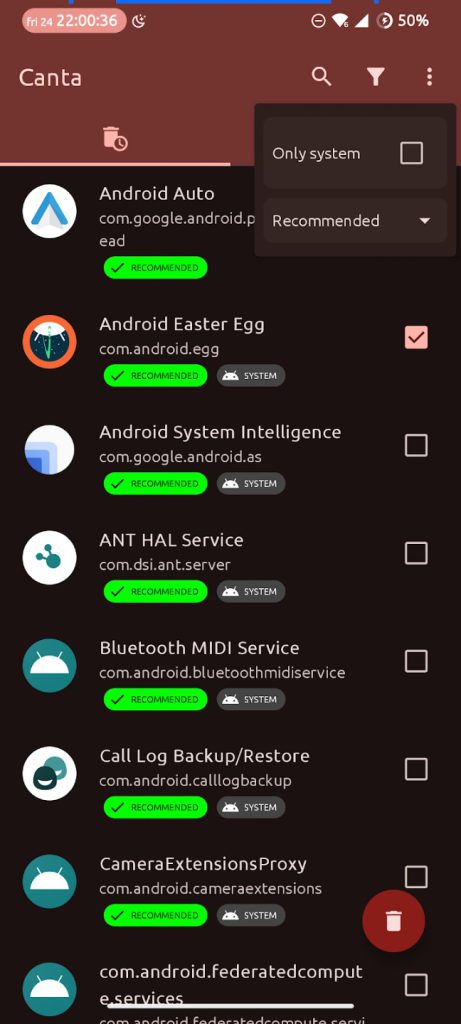
Safely strip carrier bloatware without root access using color-coded safety guidance.
A bloated Android device can feel like carrying a brick tied to a helium balloon: heavy on unnecessary apps yet slow to respond. Canta Debloater lets users reclaim significant storage and boost performance by safely removing unwanted software. This open-source tool leverages the Shizuku service, allowing uninstallation of pre-installed and user applications without root access.
Available on Google Play and F-Droid, it targets devices running Android 9.0+, enabling PC-free removal of carrier bloatware. The app integrates the Universal Android Debloat List, providing color-coded safety badges (recommended, advanced, unsafe, expert) to guide decisions. This system is like having a seasoned tech friend whispering “don’t touch that” when someone is about to delete something vital, making device cleanup both user-friendly and secure.
2. ColorBlendr
Control Material You palettes with surgical precision on Android 12+ devices.
Default Material You theming often delivers muted, wallpaper-derived colors that feel uninspired. ColorBlendr offers surgical precision. This free, open-source application lets users control Material You (Monet) color palettes on Android 12 or newer devices. Pick custom seed colors, sidestepping algorithms that churn out less-than-inspiring hues. A live preview function shows changes instantly, making adjustments feel like fine-tuning a visual equalizer.
Beyond basic color picks, ColorBlendr provides granular control. Tweak accent and background saturation, adjust lightness, and enable true pitch-black dark themes for OLED displays. This delivers the exact look desired. The app operates via Root, Shizuku, or Wireless ADB for elevated access, providing powerful on-device modification. ColorBlendr transforms a device’s visual identity from a suggestion into a personalized statement.
1. Kvaesitso Launcher
A search-centric home screen that replaces endless scrolling with instant results.
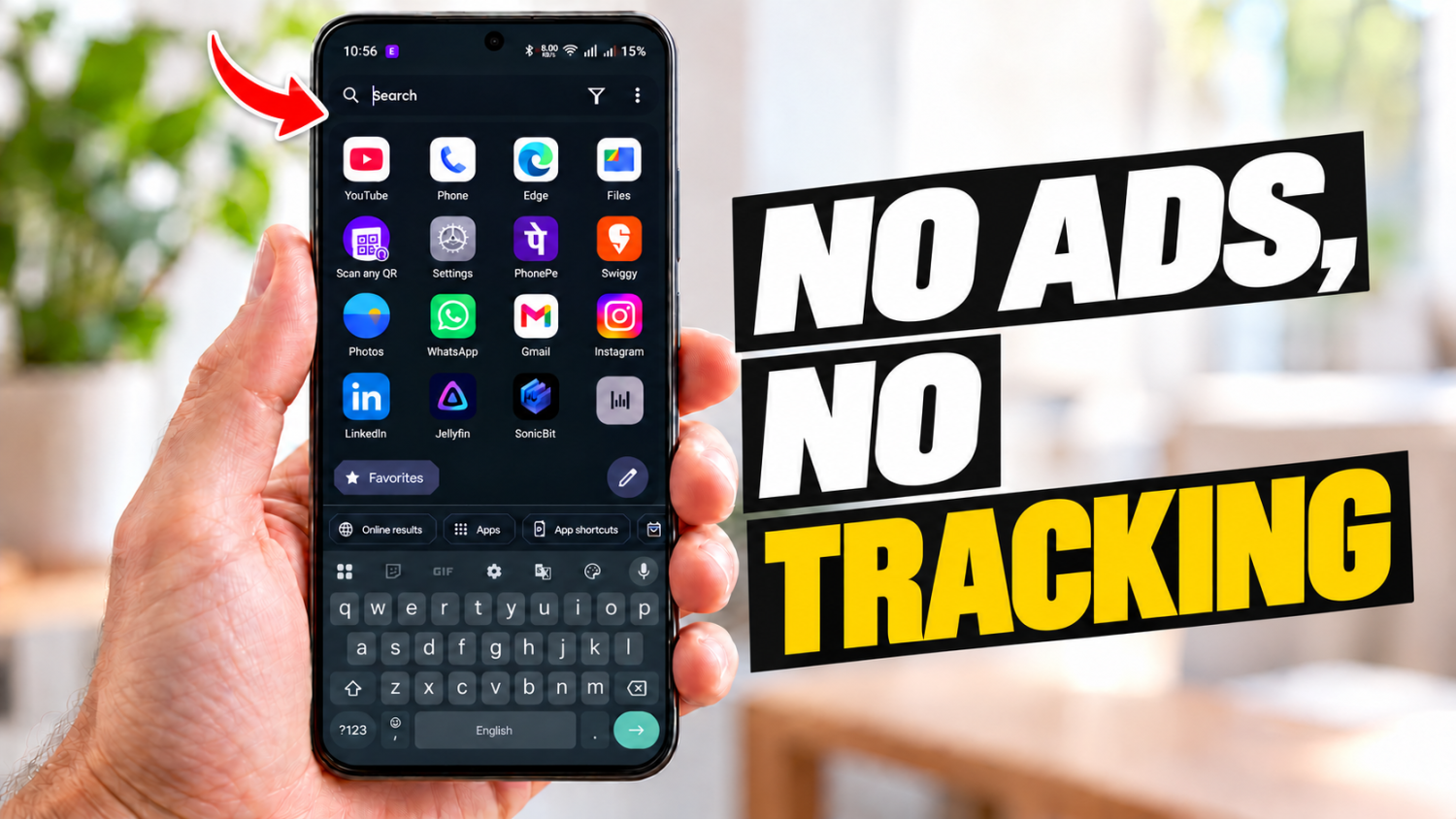
Phone screens often turn into digital scavenger hunts for apps, but the Kvaesitso Launcher cuts straight to the chase. This free and open-source Android launcher, available via GitHub, F-Droid, and IzzyOnDroid, replaces the default home screen with a global search-centric interface. It features a minimalist home screen and separate widget panel, designed for a keyboard-first workflow.
The unified search bar handles everything: on-device queries for apps, contacts, files, and calendar events, plus integration with web services like Wikipedia (depending on build). Customization extends to dynamic theming and gestures. Kvaesitso, under GPL-3.0, ensures an efficient, privacy-respecting experience. Precise results arrive without digital noise or endless scrolling. Anyone tired of hunting through app drawers will appreciate this launcher’s directness.