Apple snuck some genuinely useful tools into recent iOS updates that promise to boost your productivity, amp up your photo game, and maybe even save your sanity. Think of your iPhone as that Swiss Army knife where half the blades stay tucked away until you actually need them. These aren’t flashy marketing gimmicks—they’re the quiet workhorses that smooth out daily digital friction. Anyone who’s wrestled with wonky audio levels or blurry photos knows exactly what we’re talking about.
9. Background Sounds for Better Focus

Transform your iPhone into a personal sound sanctuary with built-in ambient audio.
Sleep troubles plague nearly half of adults due to stress and anxiety. Recent iOS updates add background sounds designed to help you chill out when life gets overwhelming. You can simulate gentle rain on a roof, the soothing rumble of a train, calming steam, or quiet night sounds.
For anyone trying to focus amidst office chatter or neighborhood chaos, it’s like having noise-canceling headphones without the hardware. Picture cranking up train sounds while your neighbor practices tuba at 3 AM—suddenly you’re on a scenic route to productivity instead of plotting revenge.
8. Tinted App Icons

Give your home screen a cohesive, curated vibe with color-coordinated apps.
Your iPhone’s home screen doesn’t have to look like a toddler’s art explosion anymore. Recent updates let you tint app icons to match your device’s color scheme, creating visual harmony that would make interior designers weep with joy.
It’s like giving your apps a coordinated makeover without the awkward reality TV reveal moment. Whether you prefer monochrome minimalism or rainbow chaos reminiscent of Lisa Frank’s fever dreams, the power sits in your palm.
7. Sound Reduction Feature

Smooth out jarring volume jumps across apps to protect your hearing.
Remember that late-night TikTok spiral where whispered ASMR suddenly exploded into death metal? Those ear-splitting transitions are history thanks to sound reduction that smooths volume peaks across apps like TikTok and Netflix.
Now when you scroll from meditation mantras to concert footage, your eardrums won’t require immediate medical attention. It’s the kind of thoughtful engineering that saves audiologist visits while keeping your midnight scroll sessions blissfully uninterrupted.
6. Low-Quality Photo Previews

Send photos instantly on weak WiFi with high-res versions following automatically.
Spotty WiFi meets instant gratification in this clever messaging update. Instead of watching paint dry while high-res photos crawl through weak signals, iMessage fires off low-quality previews first—think of it as the appetizer before the main course arrives.
Posting that perfect taco shot from a hole-in-the-wall joint with one bar of service? Friends see the low-res teaser instantly, then feast their eyes on full resolution when decent WiFi kicks in. Your phone finally thinks ahead instead of making everyone wait.
5. Swipe-to-Set Call Reminders

Never ghost yourself again with custom callback reminders on missed calls.
Digital amnesia strikes when life interrupts important calls, leaving you three weeks later wondering why your sister seems mad. Missed calls now offer swipe-to-set reminders for callbacks at custom times like tonight or tomorrow.
Picture this: elbow-deep in marinara sauce perfecting grandma’s recipe when family calls. Quick swipe sets a 7 PM reminder, saving you from both burnt sauce and family drama. It’s like having a nagging but lovable assistant who actually remembers things.
4. AirPods as Wireless Mics

Transform your earbuds into a portable recording studio with stem controls.
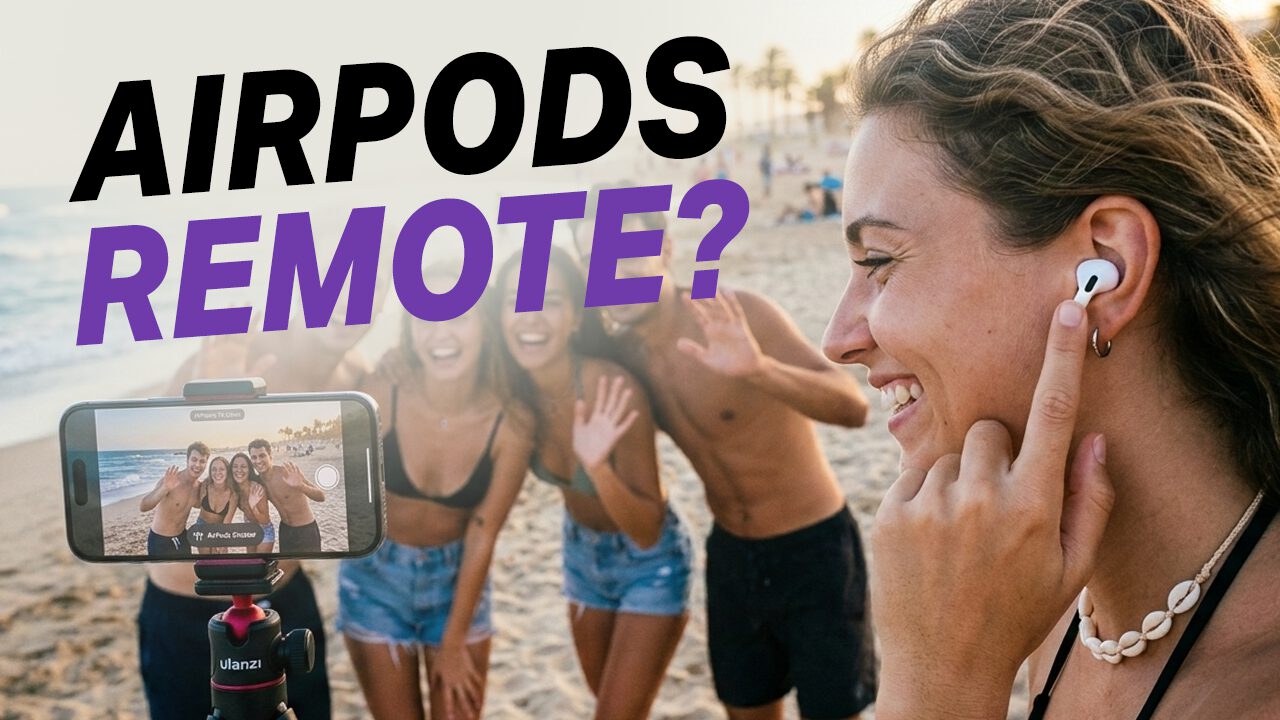
AirPods doubling as wireless microphones might win “least sexy, most practical” update of the year. These tiny buds deliver legit wireless audio for iPhone video recording, eliminating wind noise during beach vlogs or street interviews.
The real magic happens with stem controls triggering camera shutters remotely. Group shots where you’re actually in the frame? Remote selfies without awkward arm extensions? It’s like having a pocket-sized camera crew that doesn’t demand craft services.
3. Dirty Lens Detection

Get alerts when smudges sabotage your photography and disable cameras for privacy.
Perfect sunset photos ruined by mysterious blurring usually trace back to lens grime. New dirty lens detection alerts you the instant smudges interfere with your Instagram aspirations, because nobody has time for accidental soft-focus disasters.
The privacy angle matters too—lock screen camera disable options let you shut that window faster than closing incognito tabs. Sleep soundly knowing your lens isn’t accidentally broadcasting, unless you’re still rocking that webcam sticker like it’s 2016.
2. Enhanced Call Screening

Preview unknown callers with transcribed reasons before picking up.
Unknown numbers now preview their stated business via transcript, letting you screen telemarketers with dating app efficiency. Dodging your landlord about overdue rent? See if that mysterious call deserves your attention before enduring another guilt trip.
It’s a polite shield against communication chaos that respects both your time and sanity. Finally, your phone helps you avoid awkward conversations instead of creating them.
1. Customizable Alarm Controls

Fine-tune your wake-up experience with personalized snooze intervals and reminder integration.
Snooze button addicts rejoice—you can now customize intervals from 1–15 minutes instead of Apple’s rigid defaults. This transforms jarring wake-ups into gentle nudges, like a DJ slowly raising volume instead of dropping concert-level audio bombs.
Setting alarms directly from Reminders adds another layer of convenience. Tell Siri “Remind me to wake up early for that sunrise hike Tuesday,” and watch your phone become a slightly bossy but effective life coach. Sometimes the smallest improvements make the biggest difference in daily routines.