



How does it perform?
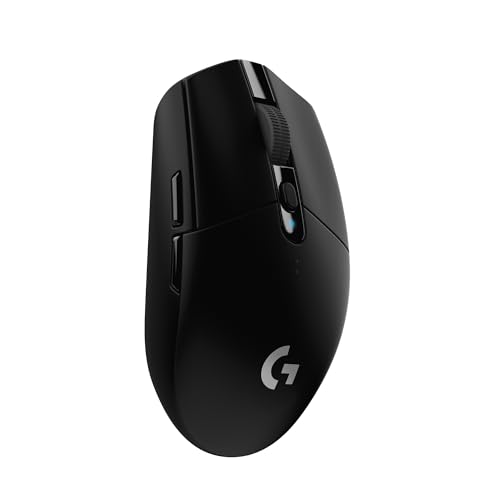
The Logitech G305 Lightspeed delivers wireless gaming performance indistinguishable from wired mice at a budget price. Testing confirmed the 1ms response time with “next-to-zero click latency” and rock-solid Lightspeed wireless connection showing no lag, dropouts, or interference. The HERO optical sensor provides a 200-12,000 DPI range with “near-perfect precision” and tracking accuracy, even at velocity. Testers drew straight lines, rectangles, and spirals with ease.
Battery life hits the claimed 250 hours (10+ days continuous use) with multiple reviewers validating it. Techgage used the mouse 6-12 hours daily for 3 months at 500Hz polling, and the battery showed 15% remaining. One reviewer spent 4 hours daily gaming and got approximately 2 months per battery.
What’s it do best?
The G305 excels at delivering high-end wireless performance for the money. That LIGHTSPEED wireless technology (the same used in Logitech’s $150 flagship mice) achieves 1ms latency indistinguishable from wired connections. XbitLabs confirmed “during gameplay, there was no difference between a wired mouse and the wireless G305” despite the much more attractive price of the G305. Multiple testers running side-by-side comparisons with wired mice reported no perceptible input delay in competitive gaming.
The HERO sensor provides 10x power efficiency over previous generations while maintaining competition-level accuracy. Tech4Gamers achieved an 80k Aimlabs score versus their typical 60k average with other mice. The sensor tracks on nine different surfaces, too: fabric, cardboard, desktops, and uneven wood. It struggled only with clear glass per TechGearLab testing.
Battery anxiety disappears with a verified 250-hour runtime. Tom’s Hardware noted “250 hours is way more than the 50 hours Razer claims with the Mamba Wireless.” The convenience of AA batteries means never plugging in for charging, too; just swap batteries in seconds and keep playing.
Tracking Performance
Sensor Resolution and Accuracy
Sensor specs determine tracking precision, surface compatibility, and movement range capabilities.
Maximum DPI: 12,000
DPI Range: 200-12,000
Maximum Tracking Speed: >400 IPS (inches per second)
Maximum Acceleration: 40G
The HERO sensor earned universal praise for precision. TechGearLab testers noted “For small, ultra-detailed precision movements, like drawing or handwriting, it doesn’t get much better than the G305 Lightspeed” with the ability to “easily draw straight lines and basic shapes, like rectangles and spirals.”
Vortez compared it directly to the Pixart 3360 sensor and found “Both were accurate, quick, fluid, and very responsive” with the 3360 only edging ahead “ever so slightly.” The review concluded “it’s only when tried side-by-side you can gauge the performance gap” and called this “high praise indeed, as the 3360 has often been regarded as one of the best sensors in class.”
Wireless Latency and Responsiveness
Latency measurements determine competitive gaming viability and wireless versus wired performance parity.
Response Time: 1ms
Polling Rate: 1,000Hz standard, adjustable down to 125Hz for endurance mode
Click Latency: 4.5ms
The 1ms response time claim received consistent validation. Nerdtechy confirmed “responsiveness at 1ms feels the same as using a wired mouse.” Tech4Gamers tested it “side-by-side with a wired Logitech G502 and found no perceptible input delay in casual and competitive gaming.” XbitLabs stated definitively “there was no difference between a wired mouse and the wireless G305 mouse.”
Surface Compatibility
Surface tracking determines usability across different desk and pad materials.
Compatible Surfaces: Fabric, cardboard, desktops, uneven wood, matte mousepads
Incompatible Surfaces: Clear glass
TechGearLab “trialed it on nine different surfaces” and found “it only struggled with clear glass. Otherwise, fabric, cardboard, desk tops, and uneven wood were no match for this mouse.”
Physical Design and Ergonomics
Ergonomic Design and Comfort
Ergonomic shaping determines grip compatibility, hand size suitability, and long-term comfort.
Design: Ambidextrous, symmetrical shape
Grip Compatibility: Fingertip grip (all hand sizes), claw grip (most sizes), palm grip (small to medium hands)
Hand Size Suitability: Small to medium hands optimal, larger hands find it flat/small
Surface Material: Smooth plastic with good grip, fights off smudges and fingerprints
TechGearLab testers “really enjoyed the long, flat, and generally comfortable shape” though their lead tester noted it “can feel a little flat, but nowhere near as flat as the Apple Magic Mouse.” Their extra-large-handed teammate found the flat design “a bit uncomfortable.”
DiamondLobby confirmed the shape is “suitable for right and left-handed users” but noted “the placement of the side buttons is more suitable for right-handed users than lefties.” XbitLabs called it “one of the best shapes for fingertip grip and claw grip.”
The smooth plastic chassis earned praise from multiple reviewers. DiamondLobby noted the surface “feels great to the touch” and is “almost shiny when reflecting light.” Tom’s Guide confirmed “high-quality plastic components contributing to a smooth, substantive-feeling plastic case.” The finish resists palm grease—one reviewer appreciated never needing to clean it unlike soft-touch coatings.
Build Quality and Durability
Button Switches and Tactile Feel
Switch quality affects click feel, noise, and long-term durability through millions of clicks.
Main Button Switches: Mechanical tensioning with featherlight actuation
Switch Durability: 10 million clicks (left and right buttons)
Click Force: Featherlight, one of the lowest tested
Tactile Quality: Snappy, immediate bounce back, satisfying feedback
The featherlight click force stood out in testing. TechGearLab documented it as “one of the lowest grams of force required to click either of its top buttons.” TechRadar also praised both main buttons for “mechanical button tensioning, which gives them improved consistency and allows users to do lighter presses.” One long-term user reported “after about 6 months, the left click button developed a slight squeak, which is minor but noticeable,” though this appears isolated.
Battery Access and Serviceability
Battery replacement ease impacts long-term convenience and emergency power swaps.
Battery Type: Single AA (included), compatible with AAA via adapter
Battery Access: Removable battery cover with sliding mechanism
Dongle Storage: Compartment in battery cover
User-Serviceability: Easy battery replacement, no tools required
Battery access received mixed feedback. Tom’s Guide found the shell “difficult to slide back into the case due to awkward slots” comparing it unfavorably to magnetic attachments or easy crosspoint systems. However, the reviewer noted “you probably won’t be doing this frequently enough for it to be a dealbreaker.”
The dongle storage compartment earned universal praise. Tom’s Hardware called it “helpful” as “it keeps it safe and secure while we’re on the road.” The convenience eliminates concerns about losing the Lightspeed USB receiver during travel.
Connectivity and Battery Performance
Wireless Connectivity
The type of “wireless” a mouse is determines connection stability, latency, compatibility, and interference resistance.
Wireless Technology: LIGHTSPEED 2.4GHz via USB-A dongle
Connection Stability: Rock solid with no dropouts reported in testing
The LIGHTSPEED wireless technology delivered flawless connectivity across testing. Vortez confirmed “rock solid and highly stable all throughout testing” with “no drops, latency issues or interference of any kind.” The lack of Bluetooth divided users, though. Tom’s Guide called the absence of “wired USB or Bluetooth support unthinkable for a gaming mouse going for over $50.”
One user experienced connectivity issues when the USB hub lacked sufficient bandwidth—placing the receiver within 50cm on a hub with a 5GHz keyboard receiver caused glitching until switching to a better hub with adequate bandwidth.
Battery Life and Power Management
Battery endurance determines usage time between battery swaps and overall wireless convenience.
Battery Life (Performance Mode @ 1,000Hz): 250 hours
Real-World Testing: 2-3 months at 4h/day gaming, 15% remaining after 3 months at 6-12h/day
The 250-hour claim received consistent validation. TechGearLab confirmed “250 hours of play time on one AA battery.”
Gaming Performance
Competitive Gaming Suitability
Gaming performance assesses responsiveness, sensor capabilities, and competitive viability.
FPS Gaming: Excellent; validated in CS:GO, PUBG, Warzone, Valorant, Rogue Company
Click Latency: 4.5ms delta, next-to-zero perceptible lag
Tracking at Speed: Accurate even at velocity, handles flick shots
The G305 proved itself in competitive gaming. Tom’s Hardware tested it in “Counter-Strike: Global Offensive and Rogue Company,” where “the Hero sensor felt responsive.” They also tested it in Valorant, where “the mouse buttons in particular feel tactile and reactive to rapid presses.” The wireless performance eliminated traditional wireless concerns, too, with the click latency being so minor that it was functionally unnoticeable.